
Skip to the posts
Buffalo's neighborhood journals since 2003 🍀 Patrick Spicy Devil Logan🌭 Sahlen🥨 Weber Spank🥟 Pierogi🐸 Scaj🍺 Labatt Utica Pink Cherio❄️ Snow Murder

paul’s journal

🏷️ linux

34 posts

Centos Stream

·

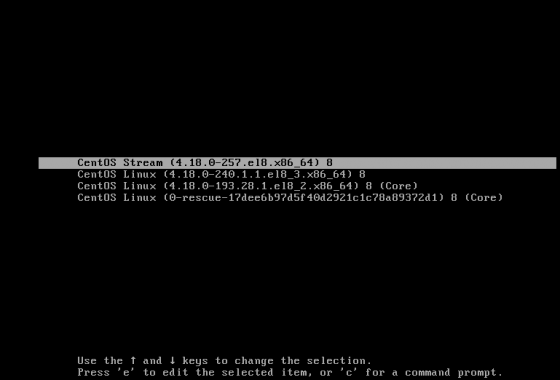
I was sad to hear about the CentOS changes when they were first posted on the centos blog but I am going to trying to not freak and think it might be a positive move. I mean it seems in the last few years I have more often been annoyed at how behind CentOS was from the current kernel. Maybe this will make it better. This article made me feel at least a little bit better.

The thing that annoyed me the most was that I had just moved servers from CENTOS 6 to 8 and I should have maybe just gone to 7. I guess only time will tell.

Fingers crossed. Server #1 - done!
image

Change the default app to open text files with in fedora 17

·

Since I installed monodevelop for a work project I was working on a few months back I have been stuck with this situation in which all text documents would start monodevelop as the default app when I clicked on them.

Each time it would happen, I figured I should look into how I set the default app for the various mime types and then I would put it off. Today I had a spare 5 minutes so I just grepped for monodevelop in my home directory figuring the settings had to be there as they weren't for every other user account. Turns out the settings are in ~/.local/share/applications/mimeapps.list

Each mime type is mapped to a .desktop file that describes what to do when the file is opened.

I switched text/plain=monodevelop.desktop to text/plain=gedit.desktop and I was good to go.

Gnome 3 Shell Extensions

·

Anyone who hated gnome 3 has not seen or tried out

It is so amazing how many plugins there are and how easy it is to install them. Not to mention that are made using the same technologies that fuel the web, meaning that ultimately they will flourish.

Everyone of my issues with gnome 3 has been solved.

And this is why fedora rules...

·

Because only supports and includes free and open source software. No proprietary programs are included in Fedora. That way things like this cannot happen the way they do in ubuntu I would so much rather have openJDK and have to install Sun java myself if I needed it then have it available from the OS vendor and have to worry about license changes removing it on it me. Here is why Fedora does not include specific proprietary software

Fedora 16 - Easiest Upgrade Ever?

·

So far everything works. I didn't have to destroy anything. It has been the easiest upgrade ever. I will post any weirdness I find tomorrow.

sudo rpm --import https://fedoraproject.org/static/A82BA4B7.txt
sudo yum update yum
sudo yum clean all
sudo yum --releasever=16 --disableplugin=presto distro-sync
sudo reboot

4 more days till Fedora 16

·

I am so excited about the new fedora build. It is interesting to learn that it was supposed to be named Beefy Miracle but apparently they extended the voting period and it ended up being called Verne. Doesn't extending a vote period seem illegitimate?

image

Anyways, Fedora 17 got the Beefy Miracle name after all Here is the history behind the name

Fedora 17 gets a name - Beefy Miracle

·

I really need to start participating in these votes.

Votes :: Name

1182 :: Beefy Miracle
1035 :: Liege
881 :: Never
791 :: Gernsback
641 :: Rocky Ripple
628 :: Alpharabius
550 :: Panguipulli
505 :: Tubeteika

Issue With Fedora 15 Terminal Transparency in Gnome 3

·

It has been making me absolutely crazy that since I switched to Fedora 15, Gnome 3 I lost my terminal transparency due to a bug in Mutter which caused the drop shadow of windows to be opaque. The bug report was filed with redhat back on March 3rd but the problem was with mutter not Fedora so they had to wait for a fix. On June 29th it was fixed in mutter and we have been waiting since then for the bug fix to make it into fedora.

I understand this kind of thing takes a while, but a status update would be nice. Finally, I decided to try the mutter/clutter version that comes with Fedora 16 (rawhide) and it works. I cannot wait for someone to back port this to Fedora 15.

If you need terminal/windows transparency in the meantime, you can update to the fedora 16 version using fedora 15.

sudo yum install fedora-release-rawhide
sudo yum update clutter mutter --enablerepo=rawhide update

Afterwards, I got perfectly normal transparency on windows with a drop shadow.

image

Fedora 15 - monitor rotation - Dell m4500

·

This is so great. I haven't had a one horizontally rotated monitor with one vertically rotated monitor setup since I left the mac platform, more than a year ago. The problem was I was always using the stupid closed source nvidia drivers because the open source nouveau drivers were not ready.

Apparently there is some complicated way of trying to get this to work ith the nvidia drivers andd xinerama but it never worked for me.

Well, this has all changed since fedora 15. All of the hardware acceleration I need is in the nourveau drivers. It runs the desktop great.

image

Monitor suport is so easy with these drivers. Simply plug the monitor in and it works - no configuration necessary. If you want to rotate one monitor, open system-settings->displays and select the rotation desired.
image

It works great and you can touch either monitor's top left corner to bring up activities mode in Gnome 3. I still prefer the hot key. Its amazing how efficient my computer usage is with Gnome 3. At first it was so different. Now I hate it when I find myself on a computer with anything else.

Sure these drivers get a few less fps than the closed drivers but nothing is noticeable as I am not playing games and the convenience of not having to deal with the nvidia drivers is amazing.

UPDATE: Not only is this so totally easy. It also remembers the settings when you log back in and reconect the monitor without even having to visit display preferences.