If this makes no sense to you, then you don't need it - I don't plan on helping anyone with it. However, if it does make sense it might be very useful.
What I am going to demonstrate allows you to secure you internet connection on your laptop when you are a coffee shop or when you are somewhere where they are blocking your favorite site and you want to get around that by piping all your laptop traffic through you home computer or external server, encrypted over SSH.
This assumes both machines have SSH and are *nix flavor (mac,unix,linux). If you are using windows I think you can still do this somehow but I don't care and you can figure it out yourself.
Its really just a few simple steps. The first step is to connect to your server/home computer from from the laptop:
ssh -p SSH_PORT -D LOCAL_PORT USERNAME@SERVER
SSH_PORT = The addres you communicate over ssh with. You can leave off the -p SSH_PORT if you are using ssh on the vanilla port 22.
LOCAL_PORT - The local port you want to use for the SOCKS proxy. I would suggest something like 8080 but it really doesn't matter. Just make sure its one you are not using.
USERNAME@SERVER - The normal username@server you use to connect to your home machine or server over ssh. e.g.
myuser@mysite.com. It can also be the IP address if you don't have a domain name.
Once you have connected open up a SOCKS proxy complaint app. A common one is Firefox and great because its a web browser, so that is the kind of traffic you want to secure when surfing somewhere sketchy.
In your firefox prefs, choose the network tab.

Then set up the proxy settings to point to localhost 127.0.0.1 and the LOCAL_PORT port you choose above.
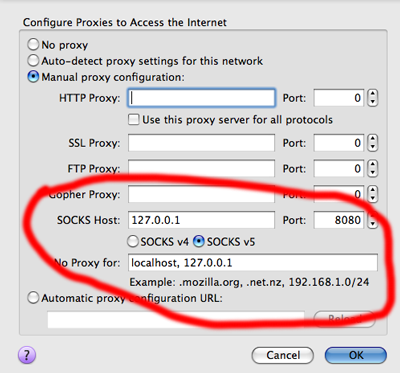
You should be set to go. To test and make sure open you /etc/hosts files and add an entry for:
0.0.0.0 google.com
Now open up another browser. When you go to google it should be site not found as you are redirecting google to 0.0.0.0 for your comp. However, when you use firefox with the SOCKS proxy it should still work when you go to google.com because the traffic is being piped through SSH to your server or home machine.
Once you are done with this test remember to take the google.com entry out of /etc/hosts and also remember all you traffic is only encrypted and piped via firefox.
Another simple test is to check your IP from your browser. Visit

in firefox. The IP should be the same as your home computer/server.
To shut down the proxy just kill the process for the ssh connection to the server.
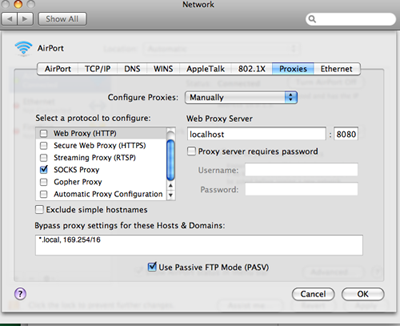
You can also set you entire system to use the proxy but that is for another day. Well here is a clue on a mac. This is in the system network preferences. Safari should be proxied afterwards.