



This irritates me so much
It seems like everytime I update anything these days on @terry's mac I need to restart. Why can't they just restart the parts that need restarting.

Windows errors
Just about every computer in the mobile classroom started up with
these errors. Why does windows XP always suck? Are the newer ones
better?


these errors. Why does windows XP always suck? Are the newer ones
better?
Jamf sendImageCapture and video spying
In light of the recent school video recording laptop drama  I decided to investigate the system my work uses to manage my laptop.
My camera is taped over and this story explains why. The pack of the cigarettes in the background are candy ones for anyone who is curious and yes I am addicted.
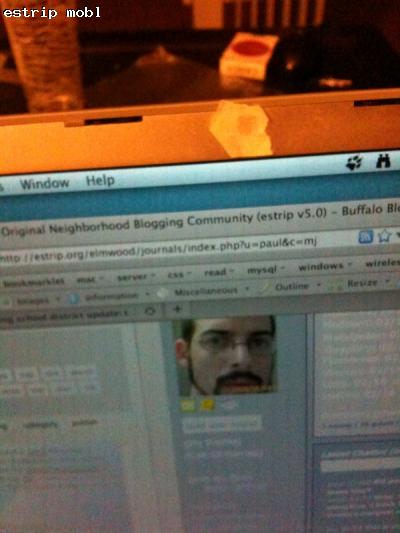
JAMF ENABLES REMOTE IMAGE CAPTURE WITH BUILT IN WEBCAM
The system my work uses to manage the macs there is called JAMF casper suite The system seems pretty solid and allows easy management of macs in an enterprise environment. It basically allows a third party at work to control and monitor the client computer and its usage at all times, install software and to run scripts as root from afar. I frankly haven't trusted or loved my computer the same since it was installed but I realize I have no choice about this as I do not own the machine. The real point of this article is about the image capture part capability which is downright sketchy.
Disclaimer: I am in no way suggesting this is being used inappropriately at my work nor am I suggesting that there was any tampering with the Jamf binary or that there is any malicious intent from anyone. I just thought this might be of interest to anyone else who has their laptop managed with JAMF.
I decided to go ahead and explore the JAMF binary on my computer with a hex editor to see if it had an mention of images.

I found a reference to sendImageCapture. It was also interesting to see they must also be using svn for development. When executed with /usr/sbin/jamf sendImageCapture it attempts to take a picture with the laptop webcam and send an image to the JSS (a server) which manages my computer. It does it pretty sneakily putting the file into /private/snapshot.jpg for a millisecond and then quickly removing it with no notice to the user.
I put a sniffer on the folder to trap the file upon creation and copy it somewhere else so I could examine it. It is indeed a snapshot from my webcam although the feature is either intentionally underexposed as some sort of encryption or slightly flawed in that the images are quite dark. Nevertheless, that can certainly be fixed with some simple image editing I was able to see the room around me in photoshop and possibly they are auto fixed when arriving at the JSS.
In defense of the current deployment I found a Jamf KB about it which seems to mentioned you could not deploy the sendImageCapture.sh and that script is in fact not deployed by our JSS means they probably thought about this and decided not to. The problem is that that script is only one line which executes:
/usr/sbin/jamf sendImageCapture
meaning it is essentially just an alias for something that is already deployed on every computer controlled by JAMF and it can be both locally and remotely executed by the casper user or any other admin user on the machine. Once again: I am in no way suggesting it is being used.
The strange part is that unlike all of the other Jamf functionality it reports nothing in either the system or jamf.log when fired but reports: Uploading /private/tmp/snapshot.jpg to the JSS_URL ... to stdout. Additionally, this feature is not listed when you use /usr/sbin/jamf help which lists all the other jamf commands.
I could not find anything referencing the microphone or sound but I am not assured that does not exist. I assume they would not have this as it would be totally illegal to record randomly without consent.
I decided to investigate the system my work uses to manage my laptop.My camera is taped over and this story explains why. The pack of the cigarettes in the background are candy ones for anyone who is curious and yes I am addicted.
JAMF ENABLES REMOTE IMAGE CAPTURE WITH BUILT IN WEBCAM
The system my work uses to manage the macs there is called JAMF casper suite
The system seems pretty solid and allows easy management of macs in an enterprise environment. It basically allows a third party at work to control and monitor the client computer and its usage at all times, install software and to run scripts as root from afar. I frankly haven't trusted or loved my computer the same since it was installed but I realize I have no choice about this as I do not own the machine. The real point of this article is about the image capture part capability which is downright sketchy.Disclaimer: I am in no way suggesting this is being used inappropriately at my work nor am I suggesting that there was any tampering with the Jamf binary or that there is any malicious intent from anyone. I just thought this might be of interest to anyone else who has their laptop managed with JAMF.
I decided to go ahead and explore the JAMF binary on my computer with a hex editor to see if it had an mention of images.
I found a reference to sendImageCapture. It was also interesting to see they must also be using svn for development. When executed with /usr/sbin/jamf sendImageCapture it attempts to take a picture with the laptop webcam and send an image to the JSS (a server) which manages my computer. It does it pretty sneakily putting the file into /private/snapshot.jpg for a millisecond and then quickly removing it with no notice to the user.
I put a sniffer on the folder to trap the file upon creation and copy it somewhere else so I could examine it. It is indeed a snapshot from my webcam although the feature is either intentionally underexposed as some sort of encryption or slightly flawed in that the images are quite dark. Nevertheless, that can certainly be fixed with some simple image editing I was able to see the room around me in photoshop and possibly they are auto fixed when arriving at the JSS.
In defense of the current deployment I found a Jamf KB about it
which seems to mentioned you could not deploy the sendImageCapture.sh and that script is in fact not deployed by our JSS means they probably thought about this and decided not to. The problem is that that script is only one line which executes: /usr/sbin/jamf sendImageCapture
meaning it is essentially just an alias for something that is already deployed on every computer controlled by JAMF and it can be both locally and remotely executed by the casper user or any other admin user on the machine. Once again: I am in no way suggesting it is being used.
The strange part is that unlike all of the other Jamf functionality it reports nothing in either the system or jamf.log when fired but reports: Uploading /private/tmp/snapshot.jpg to the JSS_URL ... to stdout. Additionally, this feature is not listed when you use /usr/sbin/jamf help which lists all the other jamf commands.
I could not find anything referencing the microphone or sound but I am not assured that does not exist. I assume they would not have this as it would be totally illegal to record randomly without consent.
Servers and uptime - happy anniversary
At work I manage 7 linux servers. Include estrip and its 8. It seems to be growing but honestly the servers pretty much manage themselves. Managing servers is not really my job but I am good at it and the server techs are mostly a windows group that seem to generally dislike my love for linux. Luckily there is a guy on the network team who is my *nix guru whenever I get stuck. He has servers with years of uptime.
That being said I am getting pretty good at it and I've learned a lot but I have to say, centos itself rocks.
The main web app linux production server I manage at work: 366 days uptime.
Estrip linux server: 369 days
Work linux db server: 76 days would be 366+ but I rebooted 76 days ago to make sure the memory only databases would populate in case of a power failure.
The windows web app servers have tiny uptimes in comparison. For example our main windows web app server is set to reboot every night because no one can figure out the memory issues. It could be the OS, it could be the programs, it could be vendor products, who knows. But one thing is sure, it seems like they constantly need to be rebooted. I am torn on if its windows itself or that no one really understands the windows web servers. I do remember my windows comp needed rebooting all the time too.
Its an interesting situation. The reason the server team loves windows servers is for the support they get from Microsoft.
Its fascinating when I see emails from microsoft support suggesting the solution to a IIS app pool issue is to reboot the server. Is everything in windows solves by rebooting and isn't that a flaw in itself? Isn't the whole point of app pools in IIS to avoid having to reboot the server when apps act up?
That being said I am getting pretty good at it and I've learned a lot but I have to say, centos itself rocks.
The main web app linux production server I manage at work: 366 days uptime.
Estrip linux server: 369 days
Work linux db server: 76 days would be 366+ but I rebooted 76 days ago to make sure the memory only databases would populate in case of a power failure.
The windows web app servers have tiny uptimes in comparison. For example our main windows web app server is set to reboot every night because no one can figure out the memory issues. It could be the OS, it could be the programs, it could be vendor products, who knows. But one thing is sure, it seems like they constantly need to be rebooted. I am torn on if its windows itself or that no one really understands the windows web servers. I do remember my windows comp needed rebooting all the time too.
Its an interesting situation. The reason the server team loves windows servers is for the support they get from Microsoft.
Its fascinating when I see emails from microsoft support suggesting the solution to a IIS app pool issue is to reboot the server. Is everything in windows solves by rebooting and isn't that a flaw in itself? Isn't the whole point of app pools in IIS to avoid having to reboot the server when apps act up?
Bold statement
This is a pretty bold statement. I wonder what all the stipulations
are?

are?
microsoft patenting sudo?
I seriously can't believe that microsoft got a patent for running commands as an administrator. Are the judges in these matters at all knowledgeable of the subject matter? The best part of the article was learning that sudo was developed at Suny Buffalo. I wonder how that factoid escaped me for so long.
Microsoft patents sudo system used in Mac OS X, Linux?
The USPTO recently granted Microsoft a patent, No. 7,617,530, which describes a method for running a command as an administrator. The filing has sparked outrage by many, including Groklaw blogger Pamela Jones, who believe the company has simply rebranded the sudo Unix command developed in the 1980s by members of the Computer Science department at SUNY/Buffalo.
The "rights elevator" patent covers "systems and/or methods... that enable a user to elevate his or her rights." Microsoft focuses on an embodiment utilizing a graphic user interface presented when the current account lacks the proper privileges for an operation. The interface then identifies accounts that have administrative privileges required for certain tasks.
The patent terms have lead to speculation that Microsoft may be attempting to receive licensing revenue from companies utilizing forms of sudo in their operating systems. The technology is currently integrated into GNU/Linux systems and Mac OS X.
Others argue that, while the patent includes sudo references, it is actually based on the graphic interface which only pops up after the user attempts to perform a task outside of their account's rights. Similar systems, however, are common to most operating systems.
Apple break pre in itunes
I have more entertaining journal to post later, but as I sit here scanning my home title to send to the mortgage people for closing tomorrow, I couldn't help but notice the threat on apple breakin palm pre compatibility with itunes
I am not surprised at all, what I am surprised about is that people are happy about it because they can't believe anyone would "steal" from apple.
Seriously fucktard. Get a clue, apple borrowed like 98% of everything in os x from unix and open source projects. If anyone is riding on anyone's coattails its apple riding on the open source communities hard work.
I am not surprised at all, what I am surprised about is that people are happy about it because they can't believe anyone would "steal" from apple.
Seriously, Apple did all thge hard work with iTunes, and a company creates a product and think that they can just ride Apple's coat tails ?
C'mon - make your own software, you stupid idiots!
Seriously fucktard. Get a clue, apple borrowed like 98% of everything in os x from unix and open source projects. If anyone is riding on anyone's coattails its apple riding on the open source communities hard work.
More SSH fun - tunneling mysql over ssh
I use ssh for port forwarding a lot. One of the most frequent uses is to allow for secure local access to a remote mysql server over ssh. In order for this to work you must have ssh accesss to the mysql box.
This is the format of the command. You must replace LOCAL_PORT and REMOTE_PORT with the ports you wish to use. Mysql is normally on 3306. Also replace user@remote_server with your login info.
ssh -L LOCAL_PORT:127.0.0.1:REMOTE_PORT user@remote_server
While you can forward directly from 3306 to 3306, lets say you already had a local mysql server running on 3306 and wanted to port foward you server's mysql on port 3306 to your localhost at port 3307.
ssh -L 3307:127.0.0.1:3306 user@remote_server
Also if you have ssh running on another port you can specify that with the -p argument
ssh -p 1506 -L 3307:127.0.0.1:3306 user@remote_server
Once you have established the connection, open a new local terminal session and type:
mysql -u YOUR_MYSQL_USER -p -h 127.0.0.1 -P=LOCAL_PORT
Enter the password and you are set to go
Make sure to replace YOUR_MYSQL_USER with your mysql user
account and LOCAL_PORT with the LOCAL_PORT you chose above, say 3306 or 3307.
If you want to have the connection debugged an not end up at the remote terminal you can add these additional arguments
ssh -v -f -N -L 3307:127.0.0.1:3306 user@remote_server
Remember to change the remote ssh port if you need it.
ssh -p 1506 -v -f -N -L 3307:127.0.0.1:3306 user@remote_server
This is the format of the command. You must replace LOCAL_PORT and REMOTE_PORT with the ports you wish to use. Mysql is normally on 3306. Also replace user@remote_server with your login info.
ssh -L LOCAL_PORT:127.0.0.1:REMOTE_PORT user@remote_server
While you can forward directly from 3306 to 3306, lets say you already had a local mysql server running on 3306 and wanted to port foward you server's mysql on port 3306 to your localhost at port 3307.
ssh -L 3307:127.0.0.1:3306 user@remote_server
Also if you have ssh running on another port you can specify that with the -p argument
ssh -p 1506 -L 3307:127.0.0.1:3306 user@remote_server
Once you have established the connection, open a new local terminal session and type:
mysql -u YOUR_MYSQL_USER -p -h 127.0.0.1 -P=LOCAL_PORT
Enter the password and you are set to go
Make sure to replace YOUR_MYSQL_USER with your mysql user
account and LOCAL_PORT with the LOCAL_PORT you chose above, say 3306 or 3307.
If you want to have the connection debugged an not end up at the remote terminal you can add these additional arguments
ssh -v -f -N -L 3307:127.0.0.1:3306 user@remote_server
Remember to change the remote ssh port if you need it.
ssh -p 1506 -v -f -N -L 3307:127.0.0.1:3306 user@remote_server
Socks Proxy Magic - Using SSH for proxy
If this makes no sense to you, then you don't need it - I don't plan on helping anyone with it. However, if it does make sense it might be very useful.
What I am going to demonstrate allows you to secure you internet connection on your laptop when you are a coffee shop or when you are somewhere where they are blocking your favorite site and you want to get around that by piping all your laptop traffic through you home computer or external server, encrypted over SSH.
This assumes both machines have SSH and are *nix flavor (mac,unix,linux). If you are using windows I think you can still do this somehow but I don't care and you can figure it out yourself.
Its really just a few simple steps. The first step is to connect to your server/home computer from from the laptop:
ssh -p SSH_PORT -D LOCAL_PORT USERNAME@SERVER
SSH_PORT = The addres you communicate over ssh with. You can leave off the -p SSH_PORT if you are using ssh on the vanilla port 22.
LOCAL_PORT - The local port you want to use for the SOCKS proxy. I would suggest something like 8080 but it really doesn't matter. Just make sure its one you are not using.
USERNAME@SERVER - The normal username@server you use to connect to your home machine or server over ssh. e.g. myuser@mysite.com. It can also be the IP address if you don't have a domain name.
Once you have connected open up a SOCKS proxy complaint app. A common one is Firefox and great because its a web browser, so that is the kind of traffic you want to secure when surfing somewhere sketchy.
In your firefox prefs, choose the network tab.

Then set up the proxy settings to point to localhost 127.0.0.1 and the LOCAL_PORT port you choose above.
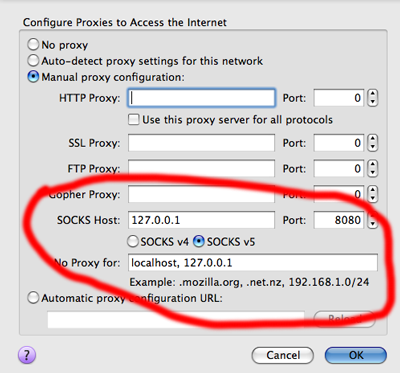
You should be set to go. To test and make sure open you /etc/hosts files and add an entry for:
0.0.0.0 google.com
Now open up another browser. When you go to google it should be site not found as you are redirecting google to 0.0.0.0 for your comp. However, when you use firefox with the SOCKS proxy it should still work when you go to google.com because the traffic is being piped through SSH to your server or home machine.
Once you are done with this test remember to take the google.com entry out of /etc/hosts and also remember all you traffic is only encrypted and piped via firefox.
Another simple test is to check your IP from your browser. Visit in firefox. The IP should be the same as your home computer/server.
To shut down the proxy just kill the process for the ssh connection to the server.
You can also set you entire system to use the proxy but that is for another day. Well here is a clue on a mac. This is in the system network preferences. Safari should be proxied afterwards.
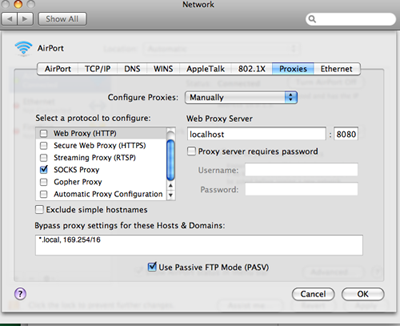
What I am going to demonstrate allows you to secure you internet connection on your laptop when you are a coffee shop or when you are somewhere where they are blocking your favorite site and you want to get around that by piping all your laptop traffic through you home computer or external server, encrypted over SSH.
This assumes both machines have SSH and are *nix flavor (mac,unix,linux). If you are using windows I think you can still do this somehow but I don't care and you can figure it out yourself.
Its really just a few simple steps. The first step is to connect to your server/home computer from from the laptop:
ssh -p SSH_PORT -D LOCAL_PORT USERNAME@SERVER
SSH_PORT = The addres you communicate over ssh with. You can leave off the -p SSH_PORT if you are using ssh on the vanilla port 22.
LOCAL_PORT - The local port you want to use for the SOCKS proxy. I would suggest something like 8080 but it really doesn't matter. Just make sure its one you are not using.
USERNAME@SERVER - The normal username@server you use to connect to your home machine or server over ssh. e.g. myuser@mysite.com. It can also be the IP address if you don't have a domain name.
Once you have connected open up a SOCKS proxy complaint app. A common one is Firefox and great because its a web browser, so that is the kind of traffic you want to secure when surfing somewhere sketchy.
In your firefox prefs, choose the network tab.
Then set up the proxy settings to point to localhost 127.0.0.1 and the LOCAL_PORT port you choose above.
You should be set to go. To test and make sure open you /etc/hosts files and add an entry for:
0.0.0.0 google.com
Now open up another browser. When you go to google it should be site not found as you are redirecting google to 0.0.0.0 for your comp. However, when you use firefox with the SOCKS proxy it should still work when you go to google.com because the traffic is being piped through SSH to your server or home machine.
Once you are done with this test remember to take the google.com entry out of /etc/hosts and also remember all you traffic is only encrypted and piped via firefox.
Another simple test is to check your IP from your browser. Visit
in firefox. The IP should be the same as your home computer/server.To shut down the proxy just kill the process for the ssh connection to the server.
You can also set you entire system to use the proxy but that is for another day. Well here is a clue on a mac. This is in the system network preferences. Safari should be proxied afterwards.