My guess is code optimization and/or floating point error. When I do the same thing on my computer [Photoshop CS3 Mac Intel v10.0] I get:
Top: L=#3d R=#3d
Left: T=#39 B=#36
Right: T=#39 B=#36
Bottom: L=#3d R=#39
...which I think is even weirder - the top is symmetric but the bottom isn't. Notice also that the stroke in your picture is asymmetric.
Furthermore - and this may or may not be a factor - in Photoshop the '.0' point is not exactly between pixels but shifted over and to the right by epsilon. So the top left subpixel in your drawing is at (0,0) but the bottom right subpixel is actually (11.999…,11.999…)
Antialiasing is dark magic, and I wouldn't count on it working one way or another, or even making sense necessarily.


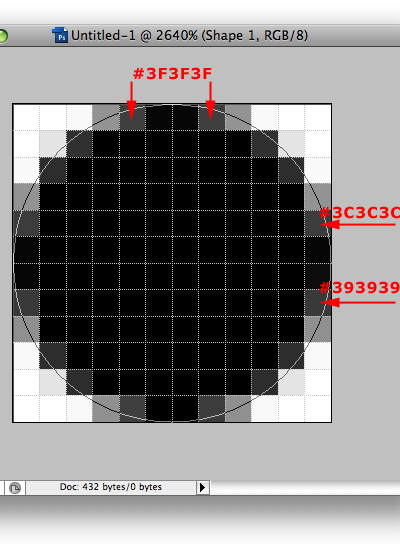


Top: L=#3d R=#3d
Left: T=#39 B=#36
Right: T=#39 B=#36
Bottom: L=#3d R=#39
...which I think is even weirder - the top is symmetric but the bottom isn't. Notice also that the stroke in your picture is asymmetric.
Furthermore - and this may or may not be a factor - in Photoshop the '.0' point is not exactly between pixels but shifted over and to the right by epsilon. So the top left subpixel in your drawing is at (0,0) but the bottom right subpixel is actually (11.999…,11.999…)
Antialiasing is dark magic, and I wouldn't count on it working one way or another, or even making sense necessarily.
- Z